

Last updated: September 2026 – checked against the current Sarathi and Vahan application status services.
“Parivahan application status” covers a few different things depending on what you applied for: a driving licence application uses one portal, a vehicle registration or transfer application uses another, and a traffic challan uses a third. This guide covers how to check each one correctly, what the different statuses mean, why updates can lag, and common reasons for rejection.
Why There Are Different Portals in the First Place
Parivahan is an umbrella name for several separate systems run by the Ministry of Road Transport and Highways, not one single database. Sarathi handles driving licences, Vahan handles vehicle registration and related services, and the eChallan Parivahan portal handles traffic fines. They share design and branding, and are all linked from parivahan.gov.in, but each keeps its own application numbers and status records. Using the wrong one for your application type is the most common reason people can’t find their status at all.
Checking Driving Licence Application Status
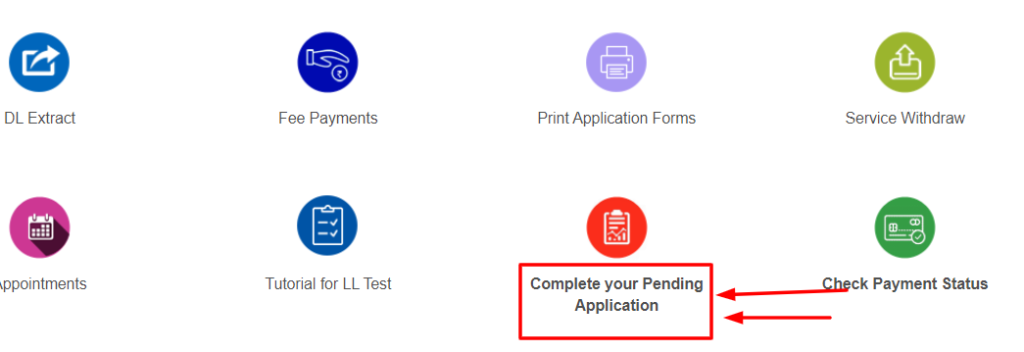
This covers learner’s licence, permanent licence, renewal, duplicate and other DL-related applications. See our full guide on checking driving licence details online.
Checking Vehicle Registration or Transfer Application Status
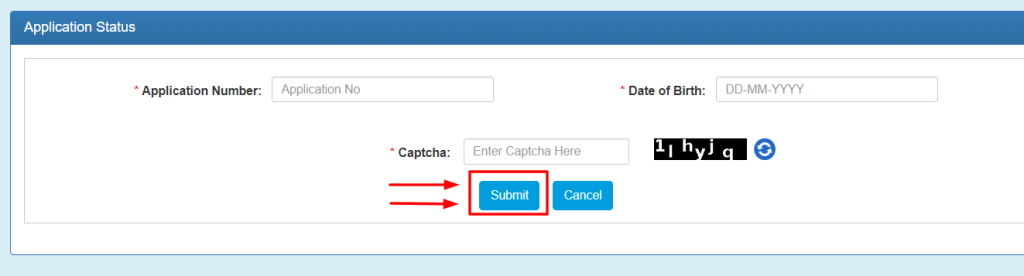
This is the correct route for tracking a new registration, an ownership transfer, or an NOC application.
Checking a Traffic Challan Status
A traffic challan isn’t an “application” in the same sense, but you can check whether one is pending, paid, or disposed of through the national eChallan Parivahan portal, using your challan number or vehicle registration number. See our full guide on how to check and pay e-challans for the complete process.
What Information You’ll Need
If you’ve lost your application number entirely, the RTO or office where you applied can usually look it up if you provide your name, date of birth and the approximate date you applied.
What the Different Statuses Mean
| Status | Meaning |
|---|---|
| Pending / Under Process | Submitted but not yet fully processed. No action needed unless it’s well overdue. |
| Document Verification Pending | The office needs to check your documents, sometimes requiring an in-person visit. |
| Approved | Processed successfully; the licence, RC, or certificate has been issued. |
| Rejected | There’s an issue that needs fixing before resubmission; the reason is shown on the portal. |
Why Status Updates Sometimes Lag
It’s common for the portal to show “Pending” for longer than expected, even when work is genuinely progressing behind the scenes. RTOs often process applications in daily or weekly batches rather than updating each one the moment something changes, and a document sent for physical verification can sit with an inspector for a few days before the system reflects that. This is normal and not usually a sign anything has gone wrong. Give it a reasonable amount of time, and check again in a few days, before assuming there’s a problem.
If Your Application Is Rejected
The portal shows the specific reason for rejection. Common causes include:

Correct the specific issue shown and resubmit; in most cases you don’t need to restart the entire process from scratch, since the RTO usually keeps your earlier submission on file and only needs the corrected item.
If You’re Still Stuck After Checking
Frequently Asked Questions
How long does it take to process an application?
This varies by the type of application and the RTO’s workload, but most updates appear within a few days to a couple of weeks.
Can I check someone else’s application status?
You need that person’s application number and verification details (such as date of birth for a DL application) to check it, so in practice you can only check applications you have those details for.
Can I check status using the mobile app?
Yes, the mParivahan app supports checking application status using the same details as the website.
Why do vehicle and driving licence applications use different websites?
Sarathi and Vahan are separate systems under the same Ministry of Road Transport and Highways umbrella: Sarathi handles licences, and Vahan handles vehicles. Both are accessible through parivahan.gov.in.
Do I get notified automatically when my status changes?
Many RTOs send an SMS or email update at key stages (such as approval or a rejection), but this isn’t guaranteed for every application type, so it’s worth checking the portal yourself periodically rather than relying only on a notification.
Related guides: Parivahan Helpline Number, Vehicle RC Status, Vahan Application Status.