

Last updated: September 2026 – checked against the current Vahan tax payment and check post services.
This guide focuses on the practical side of paying vehicle tax: which service to use for your situation, the steps online and at the RTO, how commercial vehicles and interstate trips are handled, and what to do if a payment fails or you need your receipt again. For how road tax is calculated and the green tax on older vehicles, see our E-Vahan tax guide.
Which Tax Payment Do You Need?
“Vahan tax payment” can mean a few different things, and picking the right one saves time:
| Situation | What to pay |
|---|---|
| New private vehicle | One-time road tax at registration, usually handled by the dealer |
| Commercial vehicle | Periodic road tax (monthly, quarterly or annually, depending on state) |
| Vehicle moved permanently to a new state | Road tax in the new state at re-registration, after getting an NOC |
| Commercial or tourist vehicle making a trip into another state | Border tax / check post tax for that state |
| BH-series (Bharat series) vehicle | Road tax every two years instead of a lump sum |
| Old vehicle at RC or fitness renewal | Green tax, alongside the renewal fee |
For most private car and bike owners, road tax is paid once at registration and never again for the life of the RC, so if you’re a private owner being asked to pay “annual Vahan tax,” double-check the request is genuine before paying.
How To Pay Vahan Tax Online
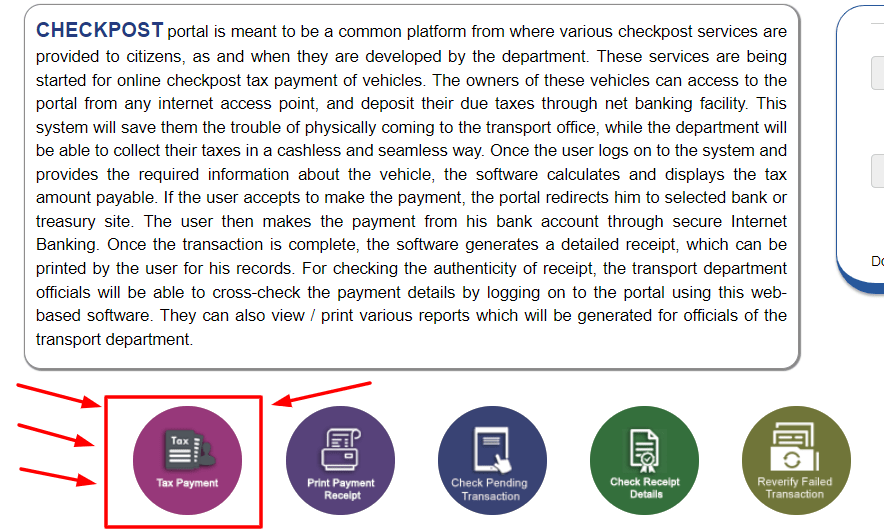

Menu names can differ slightly between states, and a few states route tax payment through their own transport department portal instead. If you can’t find the option on Vahan, check your state transport department’s website.
Border Tax and Check Post Tax for Interstate Trips
Commercial vehicles, taxis and tourist vehicles entering another state for a trip usually need to pay that state’s entry or border tax, unless they hold a permit that already covers it, such as an All India Tourist Permit. This is paid through the Vahan check post tax service, where you enter the vehicle number, the state you’re entering, the tax period, and pay online before the trip. Carry the printed or digital receipt, since it may be checked at the border or by enforcement officers inside the state. Private cars on a personal trip generally don’t pay border tax, though rules for vehicles staying in another state for an extended period can differ.
Road Tax for BH-Series Vehicles
The Bharat (BH) series registration, available to defence personnel, central and state government employees, and employees of companies with offices in at least four states, lets a vehicle move between states without re-registration. Instead of a lump sum, road tax is paid every two years (or in multiples of two), based on a percentage of the vehicle’s price that’s higher for diesel vehicles and lower for electric ones. Payment is made through the same Vahan portal, and the tax must be kept current for the BH registration to remain valid.
Paying Tax Offline at the RTO
If you can’t pay online, you can pay at the tax counter of your RTO. Take your RC, a valid insurance certificate, your ID and address proof, and the vehicle’s previous tax receipt if you have one. Commercial vehicle owners paying overdue tax should also bring any notices received, since the counter will calculate the penalty along with the outstanding amount.
Documents to Keep Handy
If Your Payment Fails or You Lose the Receipt
If money is deducted but the portal doesn’t show the tax as paid, don’t pay again straight away. Wait a few hours, then use the payment verification or “failed transaction” option on the Vahan tax page to check whether the transaction was matched. If it still isn’t reflected after a day or two, contact your bank with the transaction reference and raise the issue with the RTO or the Parivahan helpline. To get a copy of a past receipt, use the reprint receipt option on the same page by entering your registration number.
Penalties for Late or Non-Payment
Penalties vary by state: some charge a percentage of the overdue tax for each month of delay, others a fixed amount. Unpaid tax also blocks services such as RC renewal, ownership transfer and NOC issuance, and a commercial vehicle running without valid tax can be detained. Paying on time is almost always cheaper than clearing a backlog later.
Frequently Asked Questions
Do private vehicle owners pay Vahan tax every year?
Usually not. Private vehicles typically pay road tax once at registration, covering the vehicle for up to 15 years. Annual or quarterly tax generally applies to commercial vehicles.
Can Vahan tax be paid offline?
Yes, at the tax counter of the RTO where the vehicle is registered.
Do I need to pay border tax when driving my private car to another state?
Generally no for a short personal trip. Border tax mainly applies to commercial, taxi and tourist vehicles. If you move to another state permanently, you’ll need to re-register the vehicle there instead.
How do I download my Vahan tax receipt again?
Use the reprint receipt option in the tax payment section of the Vahan portal, entering your registration number to find the past transaction.
Related guides: E-Vahan Tax, Vahan NOC, Vahan E-Services.