

Last updated: September 2026 – steps checked against the current Vahan, mParivahan and DigiLocker services.
Every vehicle registered in India is linked to its owner and registration details in the national Vahan database. Using just the number plate, you can check a vehicle’s registration date, RTO, model, fuel type and insurance validity online, for free. This is especially useful before buying a second-hand vehicle, after a road accident, or when you need your own vehicle’s details and don’t have the papers to hand.
This guide explains what you can see, what is kept private, and the official ways to check vehicle owner details in 2026.
What Details Can You See by Number Plate?
When you search a registration number on the Vahan portal, you will usually see:

What Is Kept Private?
To protect owners’ privacy, public searches do not show the owner’s full name, address, phone number or full chassis and engine numbers. Websites or apps that promise the full name and address of any vehicle owner are not official and may be showing outdated or incorrect data. If you need an owner’s full details for a legal reason, such as an accident or a stolen vehicle, the police and the RTO can access them.
If the vehicle is your own, you can see the complete record, including your full name and address, in the mParivahan app or DigiLocker (see Methods 2 and 3 below).
When Should You Check Vehicle Owner Details?
Method 1: Check Vehicle Details on the Vahan Portal
The official service is called Know Your Vehicle Details. It works for vehicles registered in every state and union territory, from Delhi, UP and Maharashtra to Kerala, Karnataka, Tamil Nadu and Gujarat.
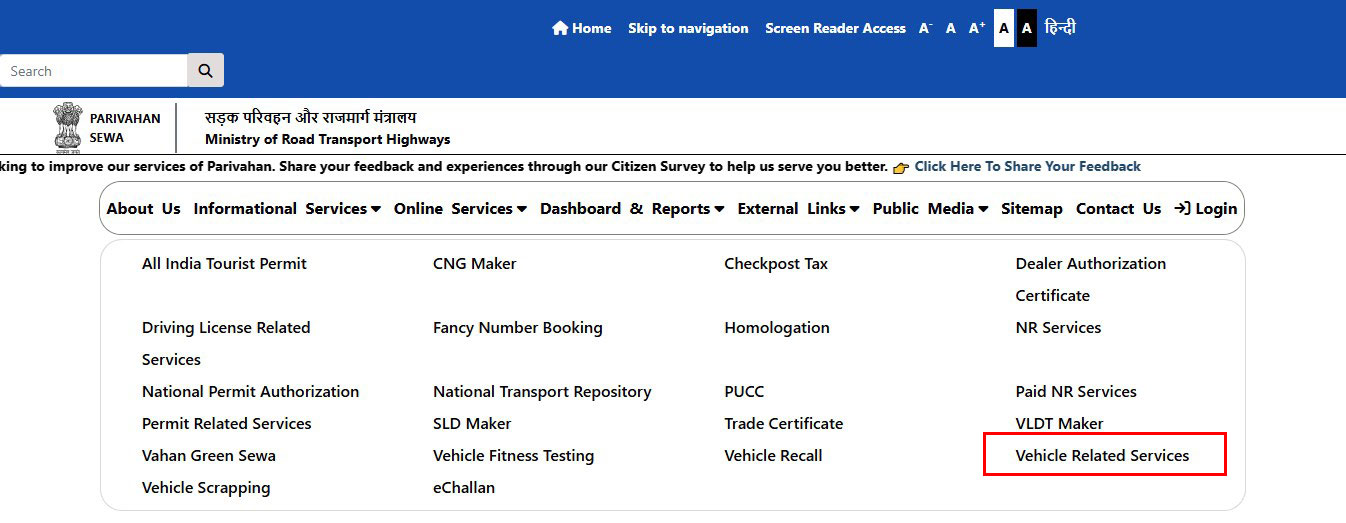
Tip: Menu names on government portals change from time to time. If you can’t find an option, look for the label closest to the ones above. The portal can also be slow or unavailable at busy times, so try again later if it doesn’t load.
Method 2: Use the mParivahan App
Method 3: See Your Own Vehicle’s Full Details in DigiLocker
Log in to DigiLocker, search for Registration of Vehicles issued by the Ministry of Road Transport and Highways, and enter your registration number and the chassis details requested. Your digital RC, with the full owner name and address, is saved to your Issued Documents. It is accepted as a valid document by traffic police. For step-by-step instructions, see our guide on how to check vehicle RC status.
Checklist Before Buying a Used Vehicle
Once you have the vehicle’s details from Vahan, compare them with the seller’s documents and the vehicle itself:
When everything matches, complete the vehicle ownership transfer through Parivahan or your RTO so the RC is updated in your name.
Checking Vehicles From Other States
The Vahan portal covers all states, so you can check a vehicle registered anywhere in India from one place. If online details are missing or look wrong, contact the RTO where the vehicle is registered. Find the right office in our state lists: Delhi, Uttar Pradesh, Maharashtra, Gujarat, Rajasthan, Karnataka, Kerala and Tamil Nadu, or see the full RTO list in India.
Frequently Asked Questions
Can I find the full name and address of any vehicle owner?
No. Public searches show the vehicle’s details with the owner name partly masked, and the address is not shown. Full owner details are available only to the owner (through mParivahan or DigiLocker) and to authorities such as the police and RTO.
Is it free to check vehicle details online?
Yes. Checking vehicle details on the Vahan portal and the mParivahan app is free. You only need a mobile number to log in.
What should I do if a vehicle hits me and drives away?
Note the registration number, time and place, get medical help if needed, and file a report with the police. The police can trace the owner through Vahan and take action. You can check online whether the vehicle is insured, which helps with any insurance claim.
Why does the portal show “record not found”?
Check that you typed the number without spaces or hyphens. Very old registrations that were never added to the Vahan database may not appear; in that case, contact the RTO where the vehicle was registered.
What is the difference between owner details and RC status?
Both come from the same Vahan record. Owner details focus on who owns the vehicle and what it is, while RC status tells you whether the registration is active, expired or suspended.