

Last updated: September 2026 – steps checked against the current Sarathi Parivahan, DigiLocker and mParivahan services.
Left your licence card at home, lost it, or still waiting for the smart card to arrive by post? You don’t have to be stuck. Your driving licence can be downloaded online in a few minutes, free of cost, and the digital version on your phone is accepted by traffic police across India.
There are three official ways to get it: DigiLocker and the mParivahan app, which give you a legally valid digital licence, and Sarathi Parivahan, where you can print your licence details as a PDF. This guide covers all three, plus what to do if you don’t know your DL number, if your licence isn’t showing in DigiLocker, or if you’ve just renewed it.
Which Method Should You Use?
| Method | What you need | Best for | Valid for police checks? |
|---|---|---|---|
| DigiLocker | DL number (Aadhaar-linked account) | An official PDF you can download and share | Yes |
| mParivahan app | DL number and date of birth | Quick access on the road, with a scannable QR code | Yes |
| Sarathi Parivahan (print) | Application number and date of birth | A printed or PDF copy of your licence details | Keep as a backup; show DigiLocker or mParivahan if asked |
Our advice: set up DigiLocker and mParivahan once. It takes about five minutes, and you’ll never need to worry about carrying the card again.
Method 1: Download Your Driving Licence in DigiLocker
DigiLocker is the government’s official document wallet, run by the Ministry of Electronics and IT. Your licence is fetched directly from the national Sarathi database, so it can’t be faked, and it comes with a QR code that officers can scan to verify it instantly.
The name on your licence must match the name on your Aadhaar-linked DigiLocker account. If the licence doesn’t appear, see the troubleshooting section below.
Method 2: Add Your Licence to the mParivahan App
mParivahan is the official app of the Ministry of Road Transport and Highways, and the one traffic police use to verify documents. It’s the handiest option when you’re out on the road.
The mParivahan licence is a virtual card inside the app rather than a PDF file. That’s fine: it’s the live version police can scan, so open the app itself when asked, not a screenshot.
Method 3: Print Your Driving Licence From Sarathi Parivahan
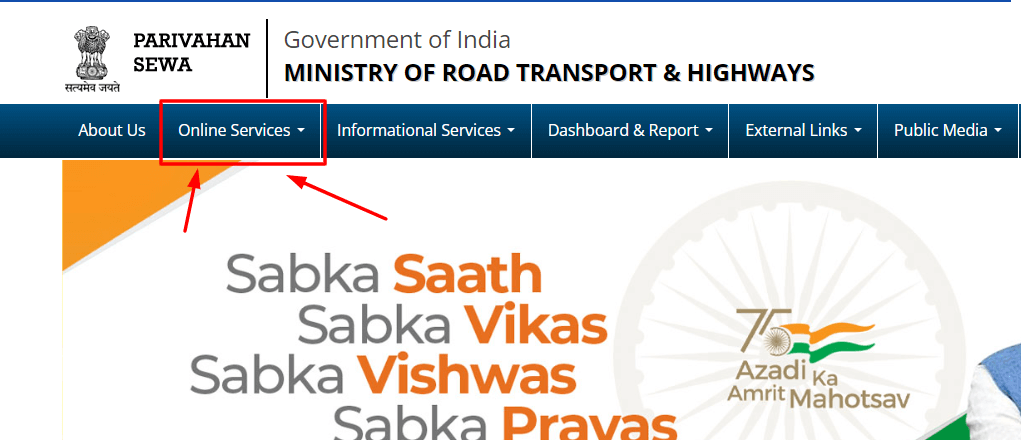
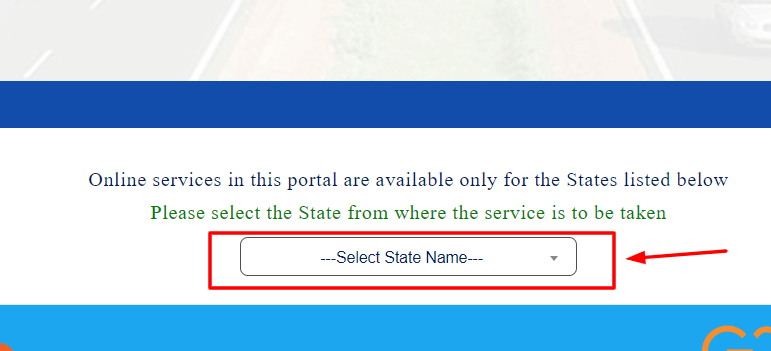
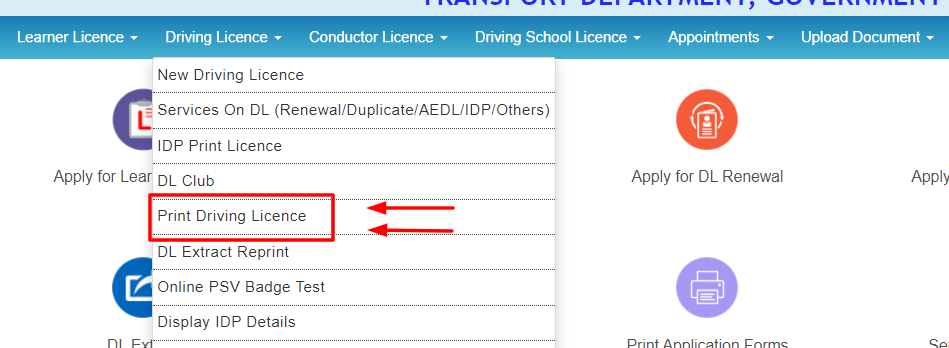
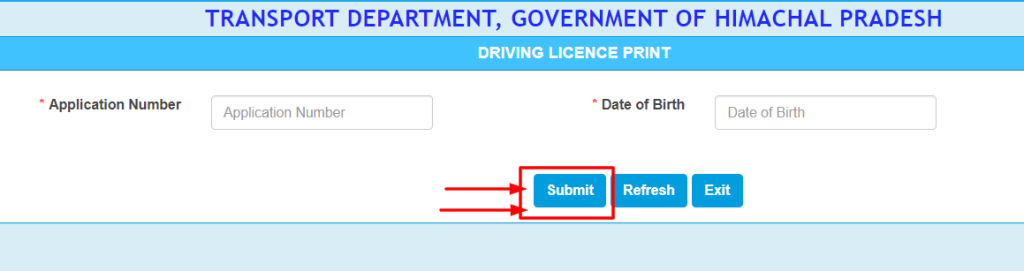
Some states also offer a DL Extract option under the DL services menu, which shows your full licence record, including all vehicle classes and validity dates. Menu names vary slightly from state to state, so look for the closest match.
How To Download Your Licence Without the DL Number
Lost the card and can’t remember the number? Try these, in this order:
Driving Licence Not Showing in DigiLocker? Common Causes and Fixes
| Problem | What to do |
|---|---|
| Wrong DL number format | Enter it without spaces or dashes, as state code + RTO code + year + 7-digit number (for example MH0120190123456). Older numbers like RJ-13/DLC/12/123456 are entered as RJ1320120123456. |
| Name doesn’t match Aadhaar | Even small differences, such as an initial instead of a full middle name, can block the fetch. Correct either your licence or your Aadhaar so they match. |
| Old licence not digitised | Licences issued many years ago may never have been added to the national database. Ask the issuing RTO to update your record in Sarathi. |
| Licence very recently issued or renewed | It can take a few days to a couple of weeks for new records to reach DigiLocker. Try again later. |
| Server busy or under maintenance | DigiLocker and Sarathi sometimes go down at busy times. Try again after a few hours. |
You can confirm that your licence exists in the national database by checking your driving licence details online first.
Downloading Your Licence After Renewal
After you renew your driving licence, the new validity date takes a few days to appear everywhere. Once your renewal is approved:
Until the new smart card arrives by post, the updated digital licence is all you need to carry.
Need Your Learner’s Licence Instead?
Learner’s licences are downloaded from a different menu. On Sarathi, look under Learner Licence for the print option rather than under Driving Licence. See our guide on the learner’s licence for details.
Andhra Pradesh Driving Licence Download
If your licence was issued in Andhra Pradesh, the same three methods work: DigiLocker and mParivahan with your DL number, or Sarathi Parivahan with your application number and date of birth after selecting Andhra Pradesh as the state. The AP Transport Department website, aptransport.org, also offers licence-related services and information for AP residents.

Is a Downloaded Driving Licence Legally Valid?
Yes, if it’s in DigiLocker or mParivahan. The Ministry of Road Transport and Highways amended the Central Motor Vehicles Rules to accept documents shown in electronic form through DigiLocker or mParivahan, and has advised state police and transport departments to accept them in place of the physical card. Because these copies are fetched live from the government database, officers can verify them on the spot.
A screenshot, photo or photocopy is not the same. It can’t be verified, so it may not be accepted. A Sarathi printout is useful as a backup and for paperwork, but at a traffic check, open DigiLocker or mParivahan.
If an officer won’t accept your digital licence, stay calm, open the app and offer to let them scan the QR code. If you still receive a challan, you can dispute it through the proper channels; see our e-challan guide for how to raise a grievance.
Is Downloading Your Driving Licence Free?
Yes. DigiLocker, mParivahan and the Sarathi print option are all completely free, and you can download your licence as many times as you like. You only pay if you want a new physical card, for example a duplicate licence after losing the original.
Watch out for paid websites and apps that charge to “fetch” your licence. You don’t need them, and some misuse the personal details you enter. Never share your Aadhaar OTP, DigiLocker login or bank details with an unofficial site. Stick to parivahan.gov.in, digilocker.gov.in and the official mParivahan app.
Tips and Common Mistakes
Lost Your Licence Card?
A digital copy is fine for daily use, but if you want a new physical card, apply for a duplicate licence on Sarathi under Services on DL. You may need a police report (FIR or lost-document report) for a lost or stolen licence. If your licence is close to expiry, renew it at the same time.
Frequently Asked Questions
Can I download my driving licence without the application number?
Yes. DigiLocker needs only your DL number, and mParivahan needs your DL number and date of birth.
How many times can I download my licence?
As many times as you like. There is no limit and no charge.
Can I download my licence right after passing the driving test?
Usually within a few days. Once the RTO approves your licence and the record reaches the national database, it becomes available in DigiLocker and mParivahan, often well before the smart card arrives. Track it on Sarathi under Application Status.
My licence has expired. Can I still download it?
Yes, but it will show the expired validity date and won’t let you drive legally. Renew it first, then download the updated copy.
I moved to another state. Which state should I select?
Select the state that issued your licence. If you have already transferred your licence to your new state, select the new state. DigiLocker and mParivahan work the same for every state.
Can I use my digital licence to rent a car?
Most self-drive rental companies in India accept licences verified through DigiLocker, but check with the company before you book.
The photo on my digital licence is old or unclear. Can I change it?
The digital copy shows the photo stored at the RTO. To update it, apply for a change of photo or a duplicate licence at the RTO; the digital version updates once the change is approved.
Don’t have a licence yet?
Start with a learner’s licence, then follow our guide on how to apply for a driving licence online.