

Last updated: September 2026 – steps checked against the current Vahan, mParivahan and DigiLocker services.
Your vehicle’s RC (Registration Certificate) status tells you whether its registration is valid, when it expires, and whether its insurance, fitness and PUC are up to date. Checking it takes less than two minutes and is completely free. It is worth doing before renewing your RC, before selling or buying a used vehicle, and whenever you are unsure whether your papers are in order.
In this guide you will learn three official ways to check RC status online, what each status means, and what to do if something looks wrong.
What Is Vehicle RC Status?
When a new vehicle is registered with the Regional Transport Office (RTO), the RTO issues a Registration Certificate (RC). The RC proves that the vehicle is legally registered and records who owns it. Registration is a legal requirement for every motor vehicle in India, and driving an unregistered vehicle or one with an expired registration can lead to heavy fines under the Motor Vehicles Act.
The RC status is the current state of that registration in the national Vahan database, for example whether it is active, expired or suspended.
Details You Will See When You Check RC Status
Method 1: Check RC Status on the Vahan Portal (Parivahan)
The official way to check RC status is the Know Your Vehicle Details service on the Vahan portal run by the Ministry of Road Transport and Highways. Menu names on the portal change from time to time, so follow the labels closest to the ones below.
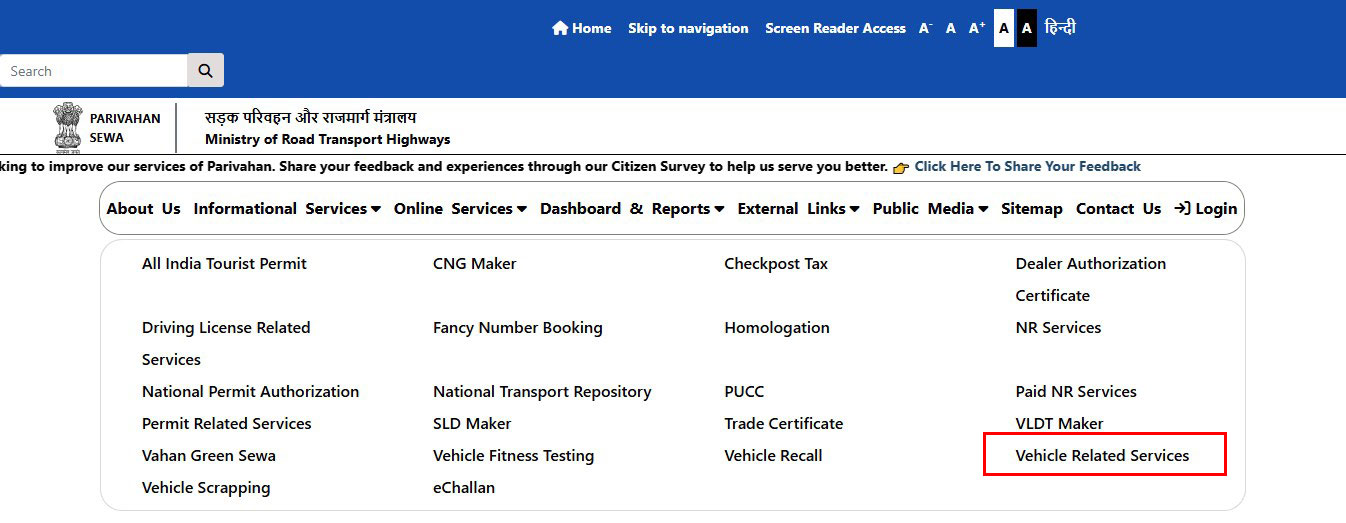
Tip: “Know Your Vehicle Details” is for vehicles whose RC has already been issued. If you have applied for a new registration, transfer or duplicate RC and are waiting, use Know Your Application Status with your application number instead.
Method 2: Check RC Status in the mParivahan App
Method 3: Get Your Digital RC in DigiLocker
DigiLocker lets you fetch an official digital copy of your own RC directly from the Vahan database. A digital RC shown from DigiLocker or mParivahan is accepted as valid by traffic police.
The name on your RC must match the name linked to your DigiLocker account. If it does not, the document may not be fetched.
What Each RC Status Means
How Long Is an RC Valid?
The RC of a private (non-transport) vehicle is valid for 15 years from the date of registration. After that it can be renewed for 5 years at a time, subject to a fitness check. Transport (commercial) vehicles follow a shorter cycle linked to their fitness certificate. Some cities, such as Delhi NCR, have separate age limits for older petrol and diesel vehicles, so check local rules before renewing.
Clear Pending Challans Before Renewal or Sale
Unpaid traffic challans are linked to the same registration number as your RC. They can hold up RC renewal, ownership transfer or an NOC. Before any of these, check your e-challans and pay any that are pending.
What If Your RC Details Are Wrong?
If the portal shows a wrong name, address or vehicle detail, take a screenshot and contact the RTO where the vehicle is registered with your RC and ID proof. Some changes, like an address change, can be applied for online through Vahan. If your RC is lost or damaged, you can apply for a duplicate RC.
Frequently Asked Questions
Is checking RC status online free?
Yes. Checking RC status on the Vahan portal, the mParivahan app or DigiLocker is free.
Can I see the full owner name by vehicle number?
No. Public searches show the vehicle and registration details, but the owner name is partly masked for privacy. The owner can see full details of their own vehicle in mParivahan or DigiLocker. For more, see our guide on vehicle owner details.
Is a digital RC valid if the police stop me?
Yes. An RC shown in DigiLocker or the mParivahan app is accepted as a valid document, the same as the physical card.
Why does the portal say “record not found”?
Usually the registration number was typed with spaces, hyphens or a wrong character. Enter it exactly as on the number plate with no spaces. Very old registrations that were never moved into the Vahan database may also not appear; in that case contact your RTO.
What is the difference between RC status and application status?
RC status shows details of a registration that has already been issued. Application status tracks a request that is still being processed, such as a new registration, transfer or duplicate RC.