

Last updated: September 2026 – checked against the current Vahan portal and privacy rules on vehicle owner information.
If you need to check an Odisha-registered vehicle, whether it’s your own, one you’re thinking of buying, or one involved in an incident, the official route is the national Vahan database through Parivahan or the mParivahan app. This guide explains how to check Odisha vehicle details online, what information you’ll actually see, how to read an Odisha registration number, and how to get full owner details when you have a legitimate need.

Understanding Odisha Registration Numbers
Vehicles registered in Odisha today carry numbers beginning with OD, followed by a two-digit RTO code, a letter series and a four-digit number, such as OD-02-AB-1234, where 02 is Bhubaneswar. Older vehicles may still show the earlier OR prefix; both are valid and refer to the same state. When you search for a vehicle, enter the number exactly as it appears on the plate or RC. See our Odisha RTO list for every code and office.
How To Check Odisha Vehicle Details Online
The same search works in the official mParivahan app, which is often quicker on a phone. The Odisha Transport Department’s own website carries state notices, fees and office contacts, but for looking up a vehicle, the Parivahan lookup is the standard route, since Odisha’s records are held on Vahan.
What Information You’ll See
The lookup deliberately doesn’t show the owner’s full name, address, phone number or a list of previous owners, to protect privacy and prevent misuse. Be wary of websites or apps that promise these for a fee; they aren’t official and may be misusing personal data. See our license plate lookup guide for more on this.
If the Details Don’t Match
If you’re checking your own vehicle and something on Vahan looks wrong, it’s worth fixing before it causes trouble. An insurance or PUC date that shows as expired after you’ve renewed usually means the insurer or testing centre hasn’t uploaded it yet, or a registration or chassis number on the certificate doesn’t match the RC; ask them to correct and re-upload it. An old address means the change of address was never recorded. A bank still listed as financier after you’ve repaid the loan means the hypothecation was never removed, which needs Form 35 and the lender’s NOC. A wrong name or chassis number needs correcting at the RTO with your original documents. If you’re checking someone else’s vehicle and the details don’t match what the seller told you, treat that as a warning sign and don’t proceed until it’s explained.
Services for Your Own Odisha Vehicle
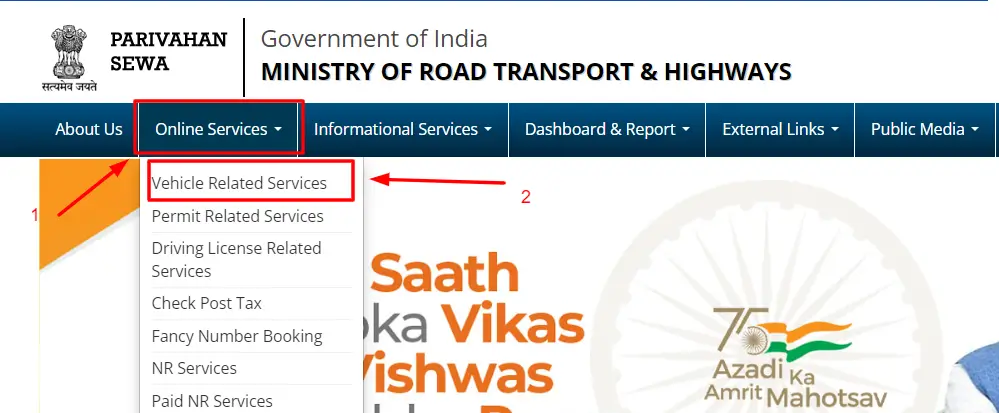
If the vehicle is yours, you can use Vahan’s Vehicle Related Services: select Odisha, enter your registration number, and verify with the last five characters of the chassis number and an OTP sent to your registered mobile number. From there you can apply for services such as an ownership transfer, a change of address, a duplicate RC, or road tax payment. You can also keep a legally valid digital copy of your RC in DigiLocker or mParivahan; see our guide to downloading your RC.

Checks Before Buying a Used Odisha Vehicle
Before paying for a second-hand vehicle, search its number on Vahan and check that the RC is active, the registration hasn’t expired, and the insurance and PUC are valid. Look at whether a bank is recorded as financier, since the seller must clear any loan and remove it from the RC before the sale. Search for pending e-challans, which stay with the vehicle rather than the seller. Finally, match the chassis number stamped on the vehicle against the RC and the last characters shown on Vahan. Our vehicle blacklist check guide covers these checks in more depth.
Getting Full Owner Details for a Legitimate Reason
Sometimes you have a genuine need for an owner’s full details, for example after a road accident or to serve a legal notice. These aren’t available online. Instead, report an accident to the police, who can obtain owner details from the RTO as part of their investigation, and your insurer can also pursue a claim against the other party. For legal proceedings, a court or your lawyer can request the information through the proper channel. The RTO where the vehicle is registered may also consider a written application explaining your reason, supported by evidence.
Frequently Asked Questions
Can I see the full owner name and address of any Odisha vehicle?
No. The public lookup only shows a partly masked name and no address, to protect privacy. Full details are released only through official channels such as the police or the RTO.
Does Vahan show a vehicle’s previous owners?
No. The public lookup shows the current registration details, not the ownership history.
Can I check Odisha vehicle details by SMS?
Use the Parivahan website or the mParivahan app instead. SMS numbers that circulate on older websites aren’t a reliable current method.
Is checking Odisha vehicle details free?
Yes. Searching on Parivahan or the mParivahan app costs nothing.
My search shows no results. What should I do?
Check the number for typos, and try both the OD and OR prefix if it’s an older vehicle. If it still doesn’t appear, contact the RTO or the Parivahan helpdesk.
Related guides: Vehicle Owner Details, Odisha RTO List, Vehicle RC Status.